 3DSettings
Zbot-i1 is a home 3D printer made by the Chinese company Zbot. It uses a Fused Deposition Modeling (FDM/FFF) printing technology and has a nozzle quantity of one. Its print speed is 100 mm/s and it comes with a heated bed. The print area is 150x150x140 mm, the material diameter is 1.75 mm, and it weighs 16.7 kg. For general slicer settings, the nozzle temperature should be set to the highest temperature needed for the specific material being printed. The layer height should be set to 0.25-0.35 mm, and the print speed should be set to 20-50 mm/s. The infill should be set to 15-50% depending on the desired strength of the printed object. The printing temperature should be set to the highest temperature needed for the specific material being printed. Lastly, the fan speed should be set to 0 for parts that require high detail and quality.
← Printer catalog · Slicer settings
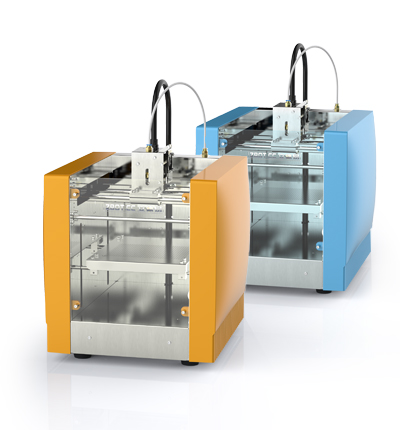
Zbot-i1 slicer settings
Recommended slicer settings for the Zbot-i1 (ZBot) 3D printer. Profiles cover PLA, PETG, ABS with starting nozzle/bed temperatures, fan, and speed guidance. Build volume 150x150x140. Fused Deposition Modeling (FDM / FFF). Use these as a baseline and fine-tune for your filament brand and enclosure.
PLAPETGABS
Zbot-i1 slicer settings
Starting temps and speeds for this machine. Generated defaults are a baseline — tune for your filament.
| Profile | Filament | Temp | Speed | Fan | Slicer |
|---|---|---|---|---|---|
| Zbot-i1 — ABS starting settings defaults | ABS | 250/100 | 100 mm/s | 0-20 | Cura |
| Zbot-i1 — PETG starting settings defaults | PETG | 240/80 | 100 mm/s | 30-50 | Cura |
| Zbot-i1 — PLA starting settings defaults | PLA | 210/60 | 100 mm/s | 100 | Cura |
Tech specs
| Type | Home |
|---|---|
| Brand | ZBot |
| Сountry | China |
| Print technology | Fused Deposition Modeling (FDM / FFF) |
| Nozzle quantity | 1 |
| Print speed | 100 mm / s |
| Print Area | 150x150x140 |
| Bed | Heated |
| Material diameter | 1.75 |
| Machine size | 150x150x140 |
| weight, kg | 16.7 kg |